Restaurant Hood Requirements Checklist
Choose your situation and who you will ask; get a printable list of questions with Y / N / N/A boxes and room for the answers.
Recent
Your last 10 settings, saved only in this browser. Nothing is uploaded.
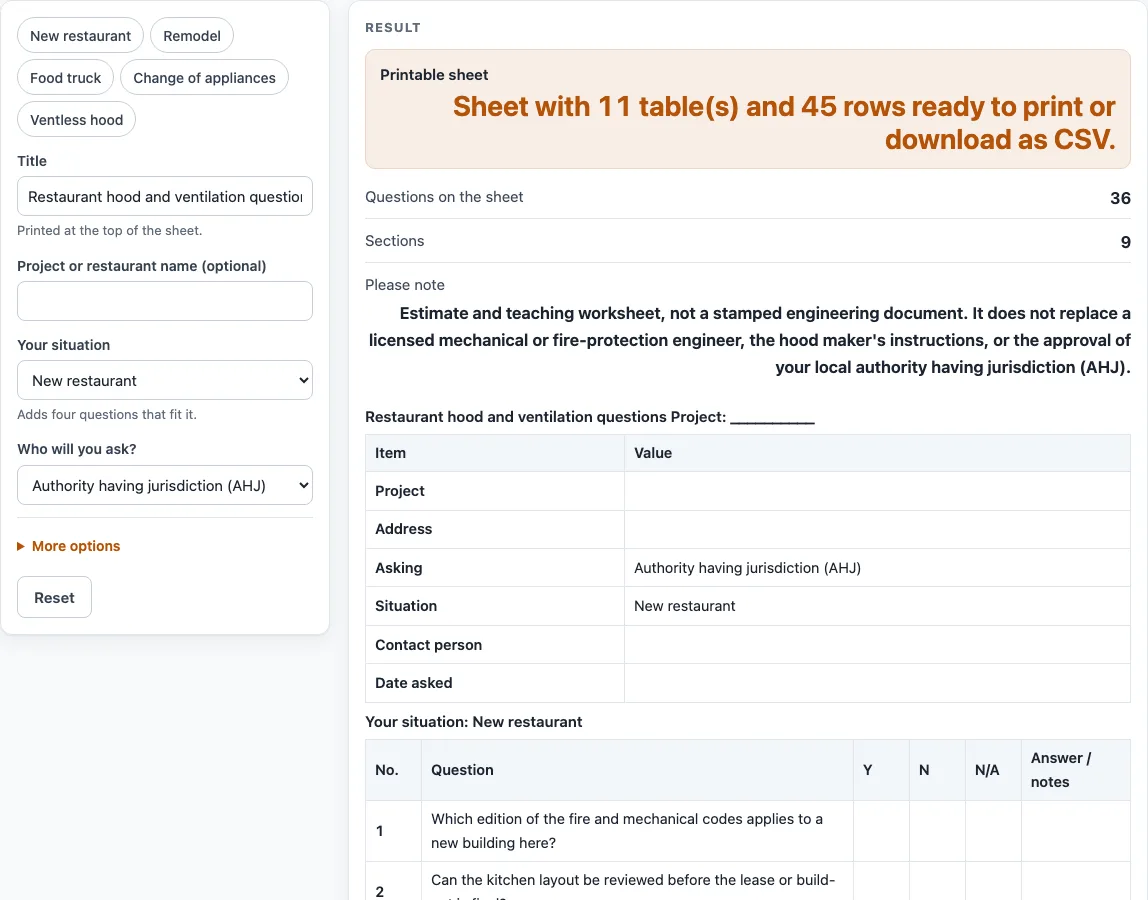
How to use the Restaurant hood and ventilation questions tool
- Type a heading in “Title” if you want one other than the default, “Restaurant hood and ventilation questions.”
- Optionally enter a “Project or restaurant name.”
- Choose “Your situation”: New restaurant, Remodel, Food truck or trailer, Change of appliances or Ventless hood. Your choice adds four questions that fit it.
- Choose “Who will you ask?”: Authority having jurisdiction (AHJ), Designer or engineer, Hood supplier or Insurer.
- Open “More options” to add an “Address,” set “Extra blank question rows” (default 3, from 0 to 15), or switch off any of the eight sections.
- Check the “Questions on the sheet” and “Sections” outputs, then read the “Please note” disclaimer.
- Print the “Printable sheet,” or download a CSV, which saves all tables.
- As you get answers, mark each question Y, N or N/A and write notes in “Answer / notes.”
The tool has five presets: New restaurant, Remodel, Food truck (hood-and-duct section off), Change of appliances (cleaning and permits sections off) and Ventless hood (asks the hood supplier). Blank rows above 15 are capped with a warning. A non-number or a negative value gives an error. If all eight sections are off, the tool shows a warning and leaves only the situation questions.
What are restaurant hood requirements?
Restaurant hood requirements are the conditions a local authority having jurisdiction (AHJ) applies to a commercial cooking hood and the systems around it. They can cover the hood type, listed assemblies, make-up air, the grease duct and fan, fire suppression, cleaning access, inspection records and permits. Which rules apply depends on the code the AHJ has adopted, so this page does not state them.
Why do restaurant ventilation requirements cover so many separate topics?
A commercial hood is one part of a connected system. Exhaust leaves through the hood and duct and must be balanced by make-up air, while the grease duct, fan and fire suppression each need their own checks. A gap in one topic can be missed when the others are reviewed alone. A fire-protection company blog (dated 2023-04-25, edition not stated) says the authority having jurisdiction should be contacted for code interpretations, which is why the AHJ is the default choice in “Who will you ask?”
Who should answer each question?
Match the person to the topic. The AHJ interprets the code for your site and issues permits. A designer or engineer explains how the system is laid out. A hood supplier can explain its own equipment and instructions, and an insurer can say what it wants to see. Sources can disagree, so ask for answers in writing and record the source of each one in the “Answer / notes” cell.
How is the sheet organized?
The sheet opens with a Project form table covering project, address, who is asked, situation, contact person and date asked. Next comes a section titled “Your situation:” followed by that situation’s four questions. Then come eight sections of four questions each: Hood type, Appliance list, Exhaust and make-up air, Grease duct and fan, Fire suppression, Cleaning access, Inspection and records, and Permits. Optional blank rows appear under “Your own questions.” The default is 36 questions in 9 sections plus 3 blank rows. Question numbers run on across sections, so one number refers to one question wherever it appears on the sheet.
What does this tool not do?
The tool does not calculate exhaust rates, duct sizes, velocities, clearances or inspection intervals, and it does not review any drawing. Its questions name categories, and the answers come from the people you ask. It does not say that a hood is approved, listed or compliant. For numbers, use a licensed engineer and the hood maker’s instructions, and confirm the details with the AHJ.
Worked examples
| Input | Result |
|---|---|
| New restaurant, asking: Authority having jurisdiction (AHJ) | 36 questions in 9 sections |
| Remodel, asking: Designer or engineer | 36 questions in 9 sections |
| Food truck or trailer, asking: Authority having jurisdiction (AHJ) | 32 questions in 8 sections |
| Ventless hood, asking: Hood supplier | 32 questions in 8 sections |
Calculated by the tool above; open it with the same values to see each step.
Frequently asked questions
Is this a list of restaurant hood requirements?
No. It is a printable set of questions about restaurant hood requirements to take to the right person. The questions name categories and state no requirement.
Does a finished sheet tell me my hood is acceptable?
No. The sheet is an estimate and teaching worksheet, not a stamped engineering document. It does not replace a licensed engineer, the hood maker’s instructions or the authority having jurisdiction (AHJ).
Who should I ask first about restaurant ventilation requirements?
The default is the authority having jurisdiction (AHJ), the person who interprets the code for your site. Choose “Designer or engineer,” “Hood supplier” or “Insurer” under “Who will you ask?” for other topics.
Does the tool upload my answers or need an account?
No. Everything runs in your browser, nothing is uploaded, there is no sign-up, and the tool is free.
Why are there blank rows at the end?
“Your own questions” holds blank rows for anything the preset questions miss. The default is 3 rows, and “Extra blank question rows” accepts 0 to 15. Values above 15 are capped with a warning.
What happens if I switch off every section?
The tool shows a warning and leaves only the questions for your situation. Keep at least one section on if you want the full set of categories.
Related tools
- NFPA 96: What It Covers and Where to Look: use it to find which NFPA 96 chapter titles cover a topic.
- Hood and Duct Cleaning Schedule: use it to plan cleaning dates and keep a service record.
- Commercial Kitchen Ventilation Worksheet: use it to gather hood, air balance, duct and fan numbers on one sheet.
- Codes, Cleaning and Checklists: use it to see all the code, cleaning and checklist pages together.
- Type 1 vs Type 2 Hood: use it to compare the two hood types and the questions to ask.
- Ventless Hood Guide: use it to list questions about ventless hoods for the maker and AHJ.
- Commercial Kitchen Hood Sizing: use it to work out a canopy hood size and exhaust airflow worksheet.
- Make Up Air Unit for Kitchen Hood: use it to work through an air balance for make-up air.