Duct Velocity Calculator
Enter the airflow and the duct size to see the velocity and velocity pressure, or type a target velocity to find the duct size. Switch between cfm and L/s.
Recent
Your last 10 settings, saved only in this browser. Nothing is uploaded.
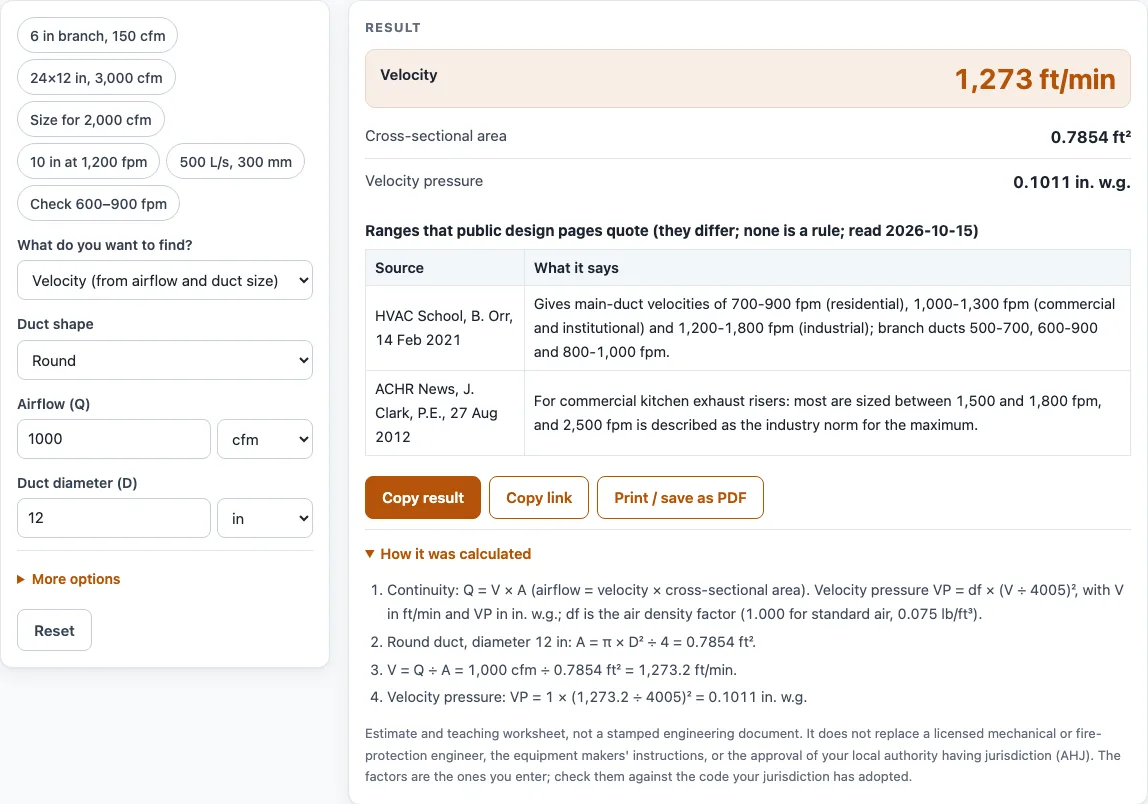
How to use the Duct Velocity Calculator
- Choose a mode: velocity from airflow and size, airflow from velocity and size, or duct size from airflow and a target velocity.
- Choose a round or rectangular duct. For a rectangular duct, type the width and height.
- Type the duct size and pick its unit: in, mm, cm, ft or m.
- Type the airflow and pick its unit: cfm, L/s or m3/h. This choice sets the output units. cfm gives ft/min, ft2, in. and in. w.g. L/s or m3/h gives m/s, m2, mm and Pa.
- In the duct size mode, type your target velocity in ft/min or m/s. To see a rectangular option, type an aspect ratio. The default is 2:1.
- Read the velocity, area and velocity pressure in the result.
- Open “More options” to change the air density inputs (temperature and elevation). There you can also type your own minimum and maximum velocity for the range check.
- Read any warning. The page flags velocity above 6,000 ft/min or below 100 ft/min, and aspect ratios above 8:1.
- Compare the result with the table under it. The table shows published ranges that differ from each other and are not rules.
Presets such as “6 in branch, 150 cfm” load a worked case you can change. For pressure loss along a duct, use the Static Pressure Calculator, because this tool does not calculate friction.
How is duct velocity calculated from airflow and duct size?
Duct velocity comes from continuity: airflow equals velocity times area, Q = V x A. If you know the airflow and the cross-section, you divide to get velocity. For a round duct, A = pi x D^2 / 4. For a rectangular duct, A = width x height.
For example, 1,000 cfm in a 12 in round duct has an area of 0.7854 ft2. Dividing 1,000 by 0.7854 gives a velocity of 1,273 ft/min. A 24 x 12 in rectangle at 3,000 cfm has an area of 2 ft2 and a velocity of 1,500 ft/min. For that rectangle the page also shows the equal-area round diameter, 19.15 in, and the hydraulic diameter, 16 in.
What is velocity pressure and how is it found?
Velocity pressure is the pressure linked to the moving air. The page uses VP = df x (V / 4005)^2 in. w.g., with V in ft/min. The constant 4005 is for standard air, which is 0.075 lb/ft3 at 70 F at sea level. The air density factor df is (530 / (460 + T in F)) x (P / P standard). The pressure ratio uses elevation in metres, and the defaults of 70 F and 0 ft give df = 1.000.
At 1,273 ft/min, the velocity pressure is 0.1011 in. w.g. The Pa value is the in. w.g. value multiplied by 249.08891. In metric units, 500 L/s through a 300 mm round duct gives 7.074 m/s and 30.11 Pa. The 4005 constant agrees with the AIHA calculator page, and a fan maker’s page seen in a search excerpt gives 4004.4 for exactly 0.075 lb/ft3, so tiny differences between tools are possible.
How is a duct size found for a target velocity?
Rearrange the same continuity rule. The area needed is A = Q / V. For a round duct, the diameter follows from the area. For a rectangular option with the same area, the short side is sqrt(A / ratio) and the long side is the ratio times the short side.
For 2,000 cfm at 1,500 ft/min, the area is 1.333 ft2. That needs a round duct of 15.64 in, or a 19.6 x 9.798 in rectangle at 2:1.
Why do published duct velocity ranges differ?
Sources do not agree on one range. HVAC School gives main-duct ranges of 700 to 900 fpm for residential, 1,000 to 1,300 fpm for commercial and institutional, and 1,200 to 1,800 fpm for industrial. ACHR News says kitchen exhaust risers are mostly sized at 1,500 to 1,800 fpm. The page shows these side by side and does not average them. Use them only as a reference, and check the hood maker’s instructions and the AHJ for the values that apply to your project.
Worked examples
| Input | Result |
|---|---|
| 1000 cfm, 12 in | 1,273 ft/min, velocity pressure 0.101 in. w.g. |
| 3000 cfm, 24 x 12 in | 1,500 ft/min, velocity pressure 0.14 in. w.g. |
| 1200 ft/min, 10 in | — undefined |
| 2000 cfm, 1500 ft/min | round 15.64 in, area 1.333 ft² |
| 500 L/s, 300 mm | 7.074 m/s, velocity pressure 30.1 Pa |
Calculated by the tool above; open it with the same values to see each step.
Frequently asked questions
Does the result say whether my duct is acceptable?
No. The result is calculated from the values and factors you enter, and it is not a stamped engineering document. Your licensed engineer, the hood maker’s instructions and the AHJ decide what applies to your project.
Why does the calculator show a warning?
It flags velocity above 6,000 ft/min or below 100 ft/min, so you can check your inputs. It also flags aspect ratios above 8:1, because the hydraulic diameter is then smaller than a round duct of the same area, and friction per foot is higher.
What units can I use?
Duct size can be in, mm, cm, ft or m. Airflow can be in cfm, L/s or m3/h. Output units follow the airflow unit, so cfm gives ft/min and in. w.g., while L/s or m3/h gives m/s and Pa.
What do the air density inputs do?
They adjust velocity pressure for temperature and elevation. The defaults of 70 F and 0 ft give a density factor of 1.000. You can find these fields under “More options”.
Can I type my own velocity limits?
Yes. Under “More options”, type a minimum and maximum velocity. The page then says whether the result is below your minimum, within your range or above your maximum. The page supplies no limits of its own.
Is my data uploaded anywhere?
No. Everything runs in your browser, and nothing you type is uploaded. No sign-up is needed, and the tool is free.
Related tools
- Ducts, Fans and Static Pressure: the hub for the duct, fan and pressure worksheets on this site.
- Static Pressure Calculator: pressure loss along a duct, which this tool does not calculate.
- Grease Duct Velocity Calculator: velocity for grease duct work, with limits you type yourself.
- Commercial Kitchen Exhaust Fan Calculator: brake horsepower, motor kW and yearly energy for the fan side.
- Exhaust Hood Calculator: open-face hood airflow, face velocity and opening size.
- Kitchen Hood CFM Calculator: total exhaust cfm for one or more commercial hoods.
- Air Changes per Hour Calculator: ACH from room size and airflow, or airflow from a target ACH.